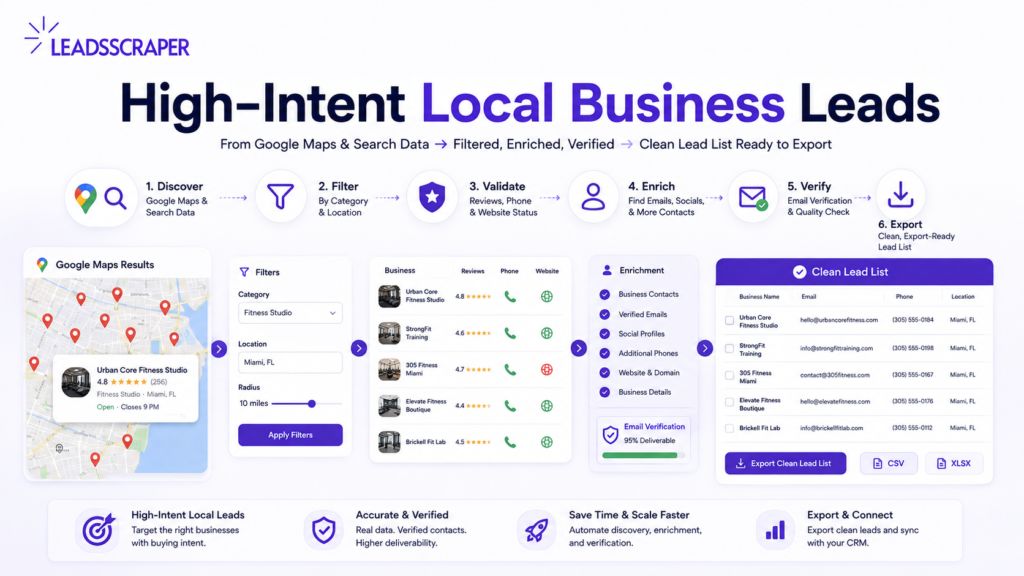
Finding local business leads fast is easy. Finding high-intent local business leads is the harder part. A large scrape from Google Maps or Google Search can still include closed businesses, wrong categories, duplicate records, weak contact paths, and leads that do not match your offer. That is why speed alone is not enough. The goal is to build a local lead list that is focused, reachable, and easier to qualify before it reaches your CRM or outreach tool. This guide shows how to filter, enrich, verify, and sort local business leads before outreach.
What Makes a Local Business Lead High-Intent?
A local business lead becomes stronger when several signals appear together.
One signal is not enough.
For example, a phone number shows that the business may be reachable. Reviews show customer activity. However, neither one proves buyer intent by itself.
A missing website may matter if you sell web design. Still, it may mean less if you sell software, ads, or another service.
Also, an email address should be verified before outreach.
Use the signals together.
| Lead Signal | What It Tells You | How to Use It |
|---|---|---|
| Category match | The business fits your offer | Keep only relevant niches |
| Location match | The business is in your target area | Avoid broad mixed-city lists |
| Reviews | The business shows customer activity | Prioritize active businesses |
| Phone availability | There is a reachable contact path | Useful for phone or manual review |
| Website status | The business may have a gap or research path | Score based on your offer |
| Enriched contact data | More details can be added | Move closer to outreach readiness |
| Verified email | Email risk is lower | Safer for email campaigns |
Use the table as a qualification guide, not as a guarantee that the business is ready to buy.
A raw business record gives you data.
A qualified lead gives you a reason to review, enrich, or contact.
That is the difference.
Start With One Niche and One City
The fastest way to create a weak lead list is to start too broad.
This query is too wide:
businesses in California
It mixes industries, buyer types, locations, service needs, and contact paths.
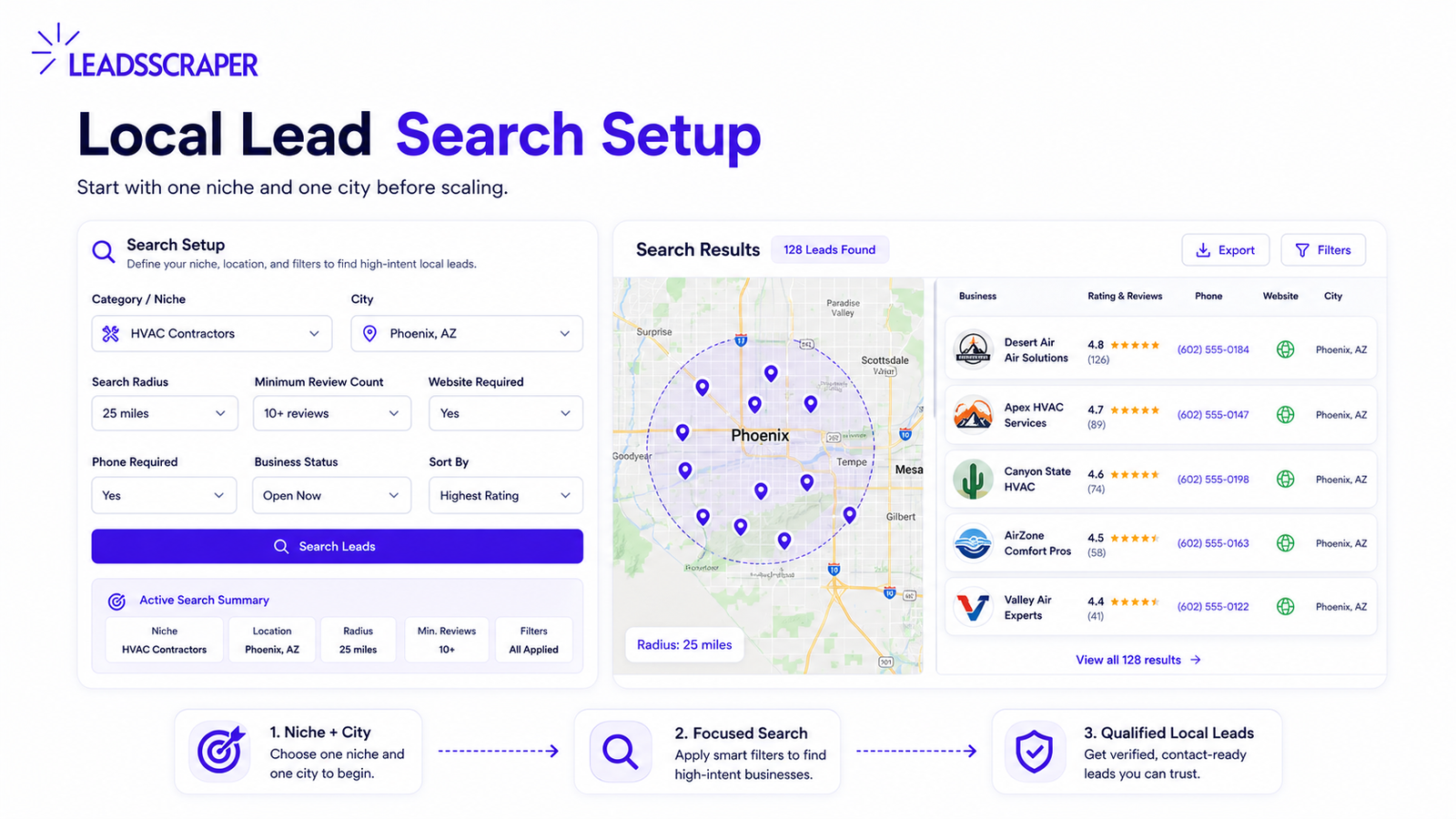
Start with one niche and one city.
Better searches:
- roofers in Miami
- dentists in Austin
- salons in Toronto
- HVAC contractors in Phoenix
- fitness studios in Chicago
This makes the list easier to qualify.
Use this rule:
- One niche
- One city
- One offer
- One lead quality standard
If your offer is website design, you may care about businesses with no website or weak website presence.
If your offer is reputation management, you may care about businesses with many reviews but average ratings.
If your offer is appointment software, you may care about businesses that rely on phone calls and manual booking.
In practice, the niche decides the signal.
Next, the city limits the market.
Finally, your offer decides what makes a lead worth contacting.
Use Google Maps and Google Search Together
Google Maps and Google Search support different parts of the same lead workflow.
First, Google Maps helps identify the business.
Then, Google Search helps complete the contact picture.
Many local businesses appear through a Google Business Profile on Maps and Search, which is why these public listings are useful starting points for local lead research.
Use Google Maps data to check:
- Business name
- Category
- Location
- Phone
- Website
- Rating
- Reviews
- Business status
Use Google Search data to check:
- Extra websites
- Contact pages
- Directories
- Social profiles
- Business mentions
Then use enrichment and verification to clean the list before outreach.
The workflow should be:
- Google Maps data for local business identity
- Google Search data for extra web presence and contact paths
- Contact enrichment for missing emails, websites, and company details
- Email verification for a safer outreach list
This keeps the process practical.
You are not only collecting business names.
You are building a list your team can contact.
For a broader explanation of where scraping fits into lead generation, read LeadsScraper’s guide on lead generation vs lead scraping
Build a Focused Local Lead List
Use LeadsScraper to collect Google Maps and Google Search business records, enrich contact details, verify emails, and export a cleaner list for outreach.
Filter, Enrich, and Verify Before Outreach
Before outreach, do not send every scraped record to your sales tool or CRM.
Start by filtering weak records.
Then check these fields:
- Business status
- Rating
- Review count
- Phone number
- Website
- Category
- Location
Remove weak records first
A weak record may have:
- No phone
- No reviews
- Unclear category
- No website
- Unknown status
- Wrong city
A stronger record may have:
- Active business
- Clear category
- Phone available
- Reviews present
- Website present or clearly missing
- Located in the target city
Both records may come from the same scrape.
Only one deserves attention first.
Enrich useful records only
After filtering, enrich the records that still look relevant.
You may need:
- Email address
- Contact page
- Social profile
- Company website
- Verified phone number
- Business domain
- Decision-maker path
LeadsScraper’s contact enrichment guide explains how enrichment helps sales teams complete missing contact details instead of working from incomplete records.
For local lead generation, enrichment should answer one practical question:
Can this business be contacted in a clean and realistic way?
If the answer is no, keep the record in Needs Review.
If the answer is yes, move it closer to Priority Lead.
Verify before export
After enrichment, verify emails before outreach.
At first, a scraped or enriched email may look useful. However, that does not mean it is safe to use.
Bad emails can cause bounces. They can also waste sending volume and make the list harder to trust.
Use this order:
- Filter weak records
- Enrich useful records
- Verify emails
- Remove risky contacts
- Export the final list
That is the cleaner workflow.
Filter, Enrich, and Verify Before Outreach
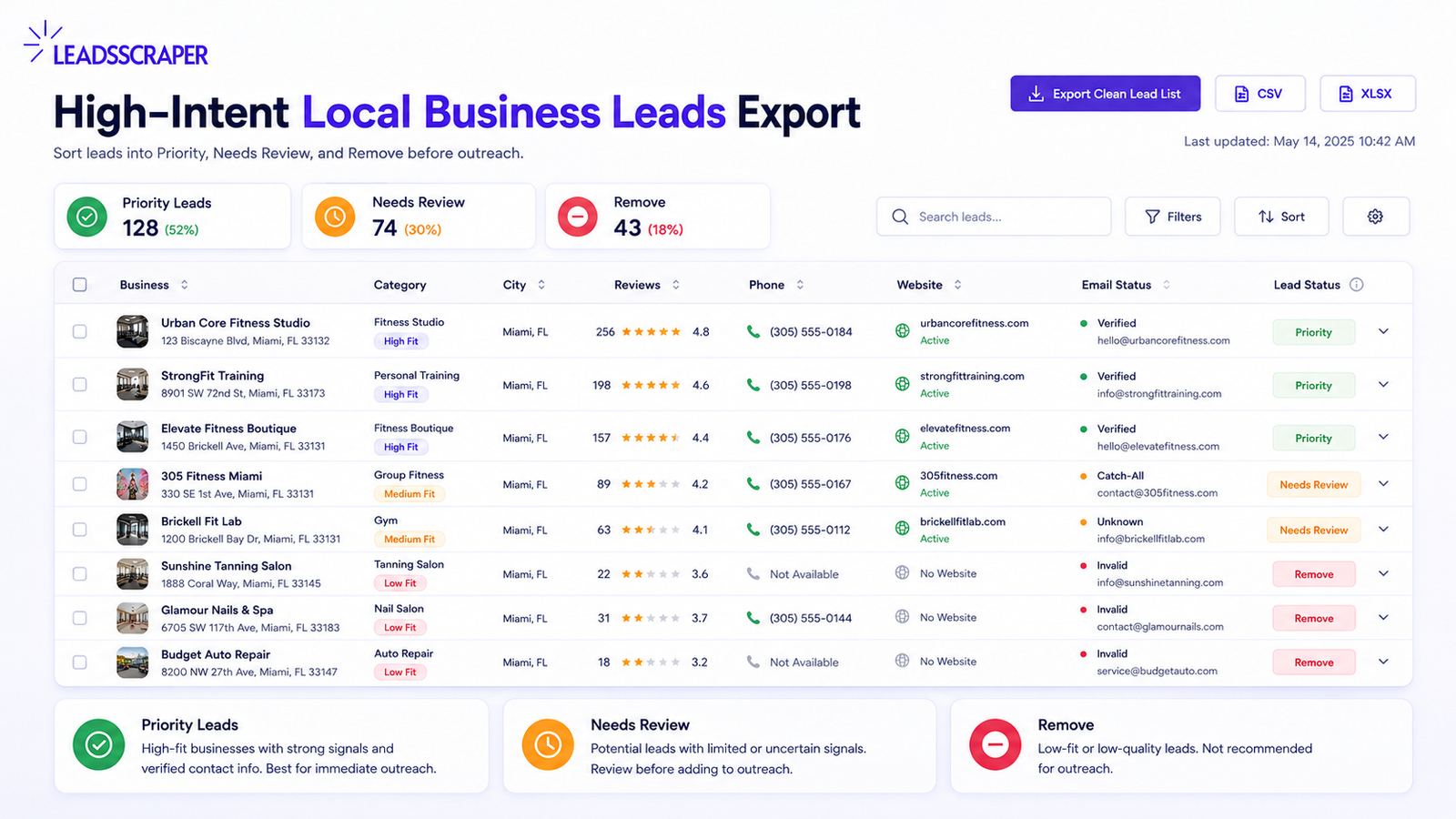
Before exporting the final list, sort each record into one of three buckets.
This is the easiest way to stop a scraped list from becoming a messy outreach file.
| Lead Status | What It Means | What to Do Next |
|---|---|---|
| Priority Lead | Matches niche, city, offer, and contact requirements | Move to outreach or CRM |
| Needs Review | Has useful signals but missing something important | Check manually before outreach |
| Remove | Closed, irrelevant, duplicated, unreachable, or poor fit | Exclude from the campaign |
Priority Lead
Use this status when the record has:
- Active business
- Correct category
- Correct city
- Phone or email available
- Reviews or customer activity present
- Website or contact status matches your offer
Needs Review
Use this status when the record has:
- Active business
- Some contact data missing
- Low reviews or unclear fit
- Possible match but not ready yet
Remove
Use this status when the record has:
- Closed business
- Wrong category
- Wrong location
- No useful contact path
- Duplicate record
- Poor fit for the offer
This structure makes the list easier to hand off to a sales team, VA, freelancer, or CRM manager.
High-Intent Local Business Leads Checklist
Use this checklist before sending the list to outreach.
- The niche is specific
- The city or target area is clear
- The category matches the offer
- The business appears active
- The record is not duplicated
- The phone number is available or contact data can be enriched
- The website status matches the offer
- The email is verified if email outreach is planned
- The lead is labeled as Priority Lead, Needs Review, or Remove
Example: local roofing leads
Imagine you sell website design and local SEO to roofing companies.
Do not start with a broad contractor list.
Start with focused searches:
- roofers in Miami
- roofing contractors in Miami
- emergency roof repair Miami
- metal roofing Miami
- flat roof repair Miami
A high-priority record might look like this:
Category: Roofing contractor
Location: Miami
Status: Active
Reviews: 58
Rating: 4.6
Phone: Available
Website: Missing or weak
Contact path: Phone or enriched email available
Lead status: Priority Lead
A weak record might look like this:
Category: General contractor
Location: Outside Miami
Status: Unknown
Reviews: 0
Phone: Missing
Website: Missing
Contact path: None
Lead status: Remove
Both records may appear in the same scrape.
Only the first one should be reviewed first.
The common mistake is simple: scraping too broadly, exporting too early, and treating missing data as intent.
For example, a missing website, missing email, or missing social profile does not automatically mean the business needs your service.
Instead, your offer should decide what makes a lead valuable.
FAQ
Most frequent questions and answers
High-intent local business leads are local businesses that show enough public signals to justify outreach, such as active status, relevant category, phone availability, reviews, website fit, and contact data that can be enriched or verified.
Start with one niche and one city, collect public business records from Google Maps and Google Search, filter weak records, enrich contact details, verify emails, and sort the final list into Priority Lead, Needs Review, or Remove.
A missing website can be useful, but only if the business is active, reachable, relevant, and shows customer activity. A blank website field alone does not prove intent.
Enrichment helps complete missing contact details such as emails, contact pages, social profiles, websites, and additional phone numbers. This makes the list easier to use for outreach.
Yes. Email verification helps remove risky or invalid emails before outreach, reducing bounce risk and improving list quality.
LeadsScraper fits agencies, freelancers, sales teams, recruiters, and B2B teams that want a simpler way to collect Google-based leads, enrich contact details, verify emails, and export lists without coding.
Find High-Intent Local Business Leads Faster
Use LeadsScraper to collect Google Maps and Google Search business records, enrich contact details, verify emails, and export cleaner local lead lists before they reach your outreach tool or CRM.