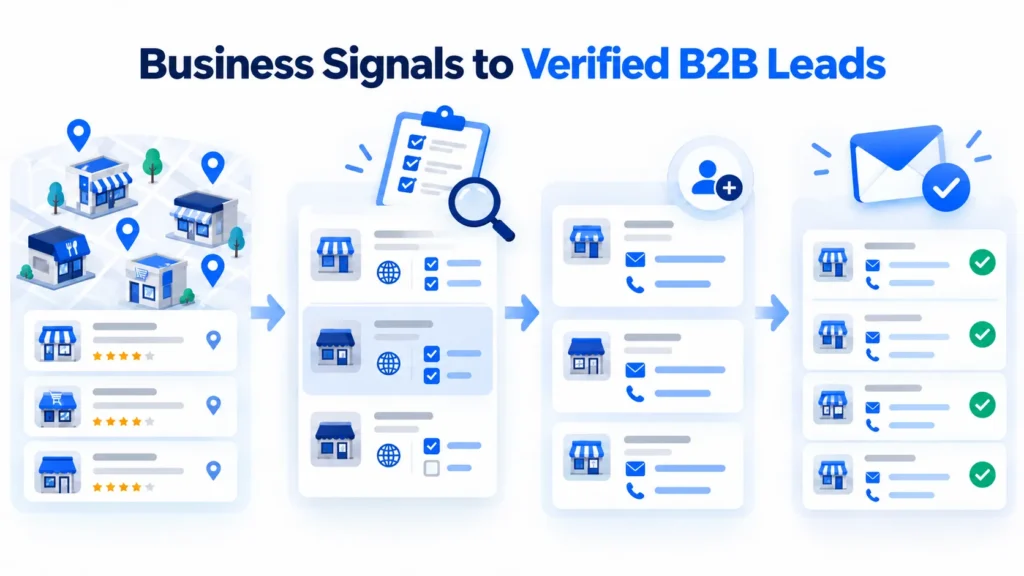
Turning business signals to verified B2B leads requires more than collecting company information. Agencies and sales teams need to identify businesses worth contacting, assess their potential needs, and find reliable contact information before starting outreach.
Signal-based prospecting helps narrow a large business list by examining company characteristics, recent activity, and signs of potential need. These signals can support qualification decisions, but they do not confirm that a business is ready to buy.
With LeadsScraper, teams can collect business records, find available contact information, and check email addresses. They can also review business signals and apply their own qualification criteria before preparing a prospect list for outreach.
Quick Answer: From Business Signals to Verified B2B Leads
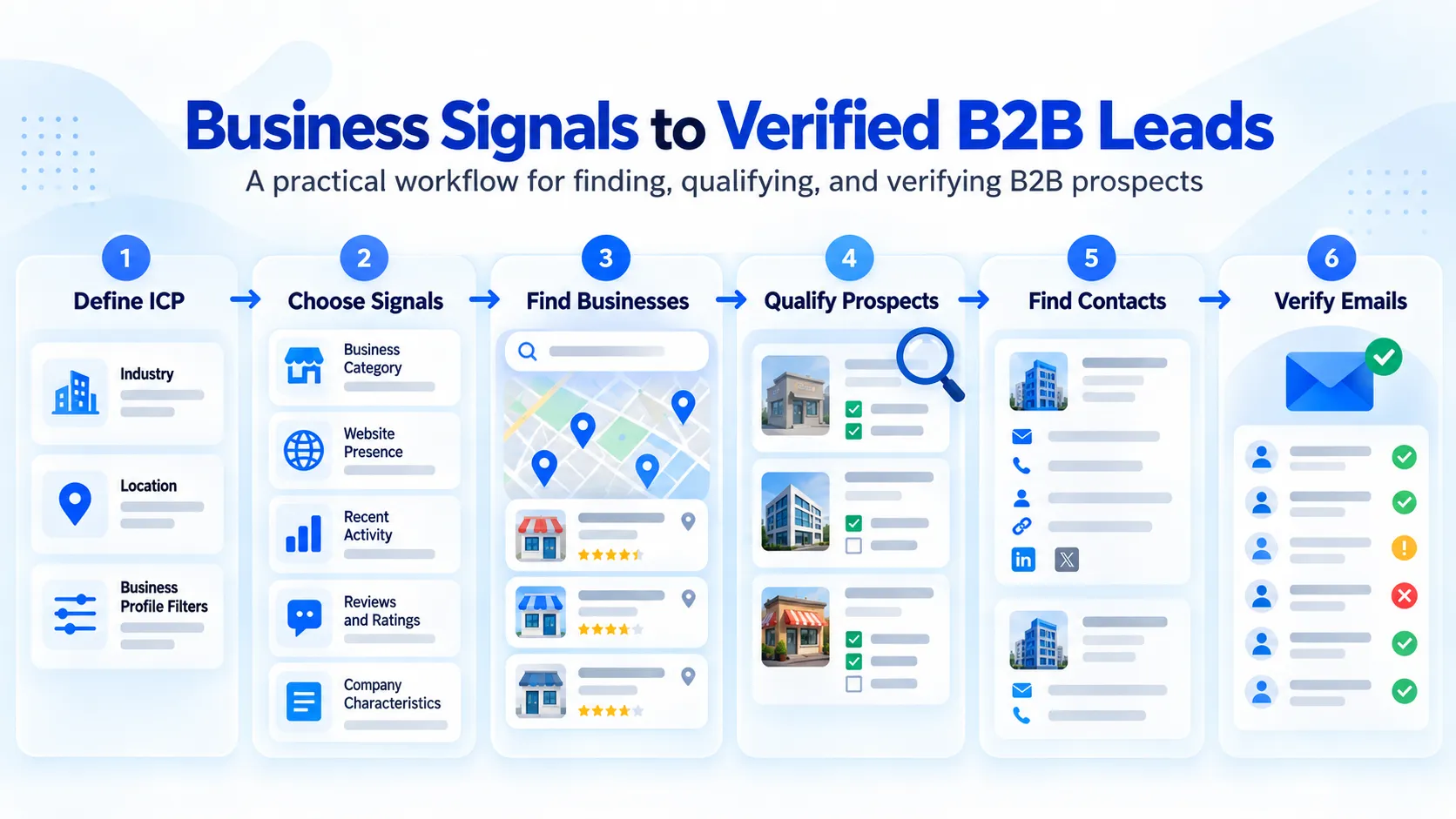
- Define your ICP based on the industry, location, and business characteristics you want to target.
- Choose relevant business signals that may indicate a need for your services.
- Find matching businesses using LeadsScraper’s Google Maps Data Scraper.
- Review and qualify prospects based on business fit, signal relevance, and supporting information.
- Find available contact details using Emails & Contacts Scraper for selected businesses.
- Verify email addresses with Email Address Verifier and prepare the qualified lead list for outreach.
How Business Signals Help Prioritize Prospects
A business may match your target industry and location but still lack a clear reason for further research. Business signals provide additional context to help agencies identify which prospects deserve closer attention.
For example, a web design agency targeting restaurants in Orlando, Florida, might look for businesses without listed websites or with outdated online information. These observations can help narrow the prospect list, but they do not confirm that a restaurant needs a new website or is ready to purchase web design services.
For more examples of narrowing local business searches, see how to find high-intent local business leads using business characteristics and available contact information.
How Signals Change the Traditional Prospecting Process
Traditional prospecting often begins with businesses filtered by industry, location, or company size. Sales teams then review each business to determine whether it fits their campaign before looking for suitable contacts.
Signal-based prospecting adds another consideration: whether the business shows a relevant condition or recent change worth investigating. For example, a web design agency might check restaurants without listed websites, while a local SEO agency might examine changes in review activity.
These observations help teams decide which prospects deserve further research before contact enrichment and outreach.
What Makes a Business Signal Useful?
A business signal becomes useful when it supports a specific prospecting decision. Four factors help determine its value:
- ICP fit: Does the business match your target industry, location, and other qualification criteria?
- Relevance: Does the signal relate to a service you offer or a problem you can address?
- Recency: Is the information current enough to support your decision?
- Actionability: Does the signal provide a reason to investigate or prioritize the business?
For example, a web design agency targeting restaurants in Orlando, Florida, might prioritize businesses without listed websites. The agency should first check whether those restaurants have active websites before deciding which prospects deserve further research.
Google’s Places API documentation describes business information fields, including website URLs, business status, and ratings. These fields provide useful context when assessing potential prospects.
Choose Business Signals Based on Your ICP
The business signals worth checking depend on your target customers and the services you offer. A missing website, low rating, or recent change in business information may be useful for one campaign but less relevant to another.
Start by defining your ideal customer profile (ICP), including business category, location, and other qualification criteria. Then select signals that help identify businesses worth investigating before collecting additional contact information.
Identify Signals of Fit, Change, Need, or Timing
Business signals help answer different questions during prospecting. Grouping them by fit, change, need, and timing makes it easier to decide which businesses deserve further research.
| Signal Category | What It Indicates | Example |
|---|---|---|
| Fit | Whether a business matches your target customer profile | A restaurant operating in Orlando, Florida |
| Change | An observable update in business information | A restaurant's website URL has changed between two research checks |
| Need | A condition that may indicate an opportunity for your services | A restaurant with no website listed in its business record |
| Timing | Recent information that may affect when to research a prospect | A newly discovered restaurant listing that needs a website check |
These signal categories can overlap. For example, a restaurant in Orlando may match a web design agency’s ICP while having no website listed in its business record. That combination gives the agency a reason to investigate further.
A missing website field doesn’t necessarily mean the restaurant has no website or needs web design services. The agency should check the information before adding the business to its qualified prospect list.
Focus on Signals That Influence Prospecting Decisions
Tracking too many business signals can make prospect qualification harder. Focus on a few indicators that help determine whether a business is relevant to your services.
For a web design agency targeting restaurants in Orlando, Florida, useful questions include:
- Does the restaurant match the target business category and location?
- Is a website listed in its business information?
- If a website exists, does it need further review for possible design or usability issues?
- Is there enough supporting information to justify contacting the business?
A missing website listing can help identify businesses for further research. The agency should check the restaurant’s actual online presence before deciding whether it belongs on the prospect list.
LeadsScraper
Search businesses by category and location, then review the information that matters to your campaign.
Find Business LeadsFrom Business Signals to Verified B2B Leads With LeadsScraper
Once you’ve defined your target businesses and selected relevant signals, the next step is collecting records and checking which prospects are worth contacting.
LeadsScraper’s Google Maps Data Scraper provides business information for initial research. Emails & Contacts Scraper can help find available contact details, while Email Address Verifier checks email addresses before outreach.
The following six steps use a web design agency targeting restaurants in Orlando, Florida, to show how business discovery, qualification, contact research, and email verification fit together.
Step 1: Set Up Your Google Maps Scraper Search
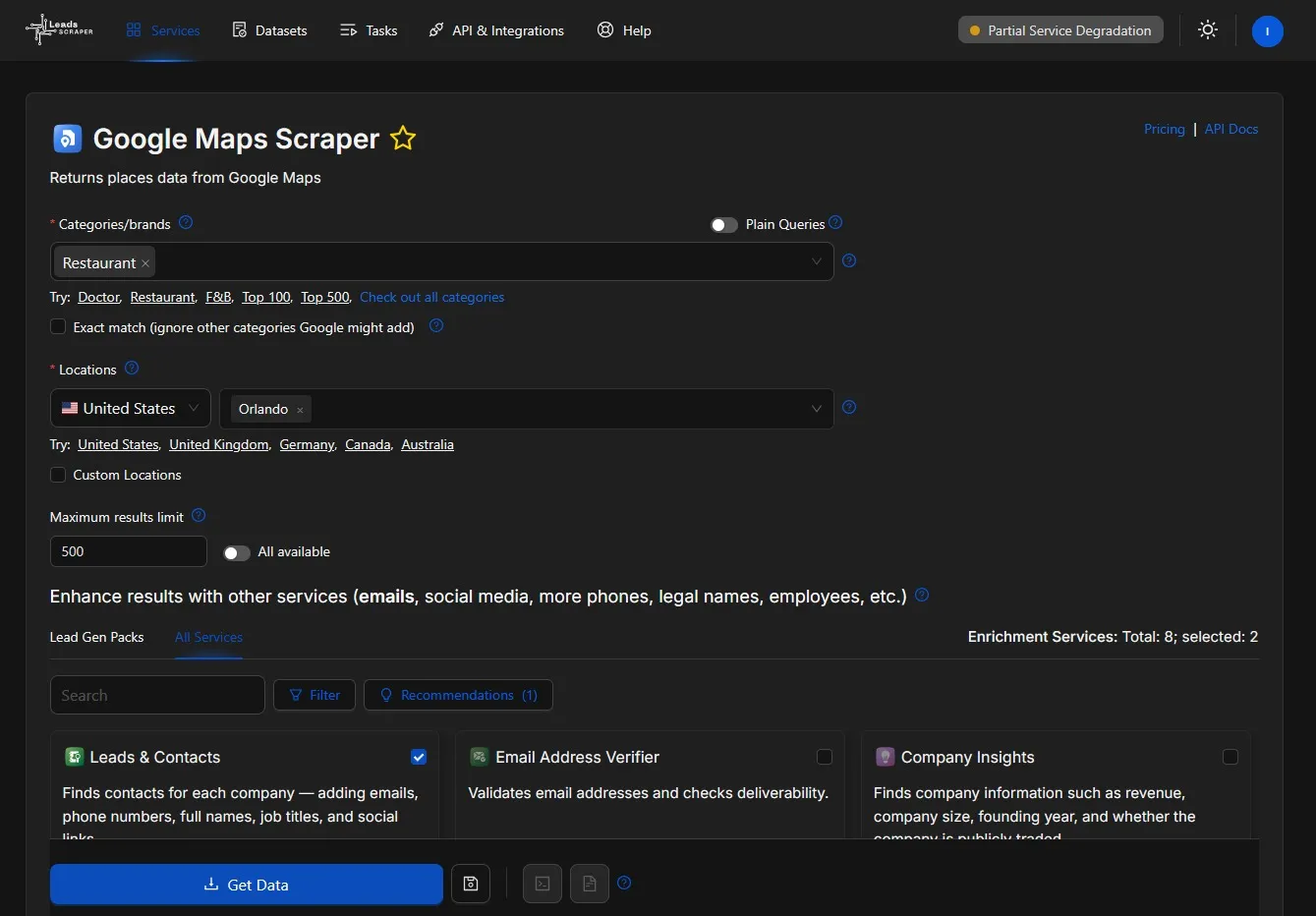
Open LeadsScraper’s Google Maps Data Scraper and enter the business category and location defined during campaign planning.
For the Orlando campaign, a web design agency would enter restaurants under Categories/brands and select Orlando, Florida under Locations.
Set the Maximum results limit based on the number of businesses you want to research. Keep the initial search focused so you can review the results and identify restaurants that match your campaign criteria before collecting additional contact information.
For a closer look at the extraction process, see the Google Maps Data Scraper tutorial.
Step 2: Apply Filters to Narrow Your Business Search
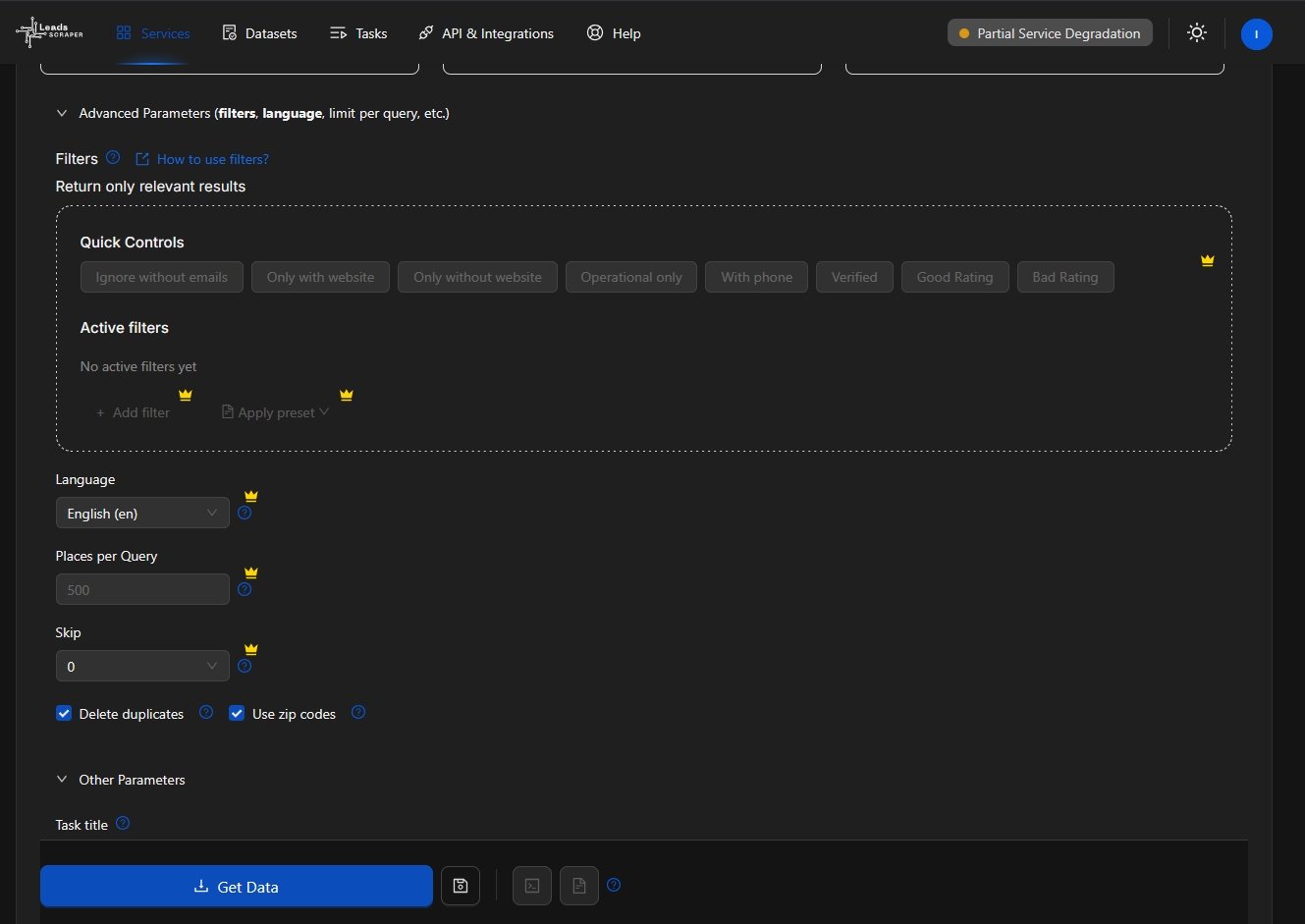
Check the available filters under Advanced Parameters in LeadsScraper’s Google Maps Scraper before collecting your results.
For the Orlando restaurant campaign, the Only without website filter can help narrow the search to listings without website information. Other controls, such as Operational only and With phone, can help refine the results based on your campaign requirements.
Free Tier users need to upgrade their account to access the full Advanced Filters functionality. If these filters are unavailable, collect the matching restaurant records first and check the website field in the exported results.
Confirm each restaurant’s online presence before treating a missing website as a potential business opportunity.
Step 3: Collect and Review the Business Records
Once your search settings are ready, click Get Data in LeadsScraper’s Google Maps Scraper to start collecting matching businesses.
For the Orlando restaurant campaign, enable Delete duplicates to reduce repeated business records within the task. The Use zip codes option can also help organize searches across smaller geographic areas.
Download the results in XLSX format and review the available business names, addresses, categories, websites, phone numbers, ratings, and business status. Remove restaurants outside your target area and check missing website information before selecting businesses for further qualification.
Step 4: Qualify Prospects Using Business Signals
Review the collected restaurant records to identify businesses that match your ICP and show signals relevant to your web design services.
For the Orlando campaign, start with restaurants that have no website listed in their business records. Check whether each restaurant has an existing website by searching for its business name and reviewing its online presence.
If a website exists, examine its design, mobile usability, and contact information to determine whether further research is worthwhile. Record your findings and prioritize restaurants with relevant, verified observations before moving to contact enrichment.
Step 5: Enrich Contacts and Verify Email Addresses
After identifying businesses that meet your qualification criteria, collect available contact information and check email addresses before preparing your outreach list.
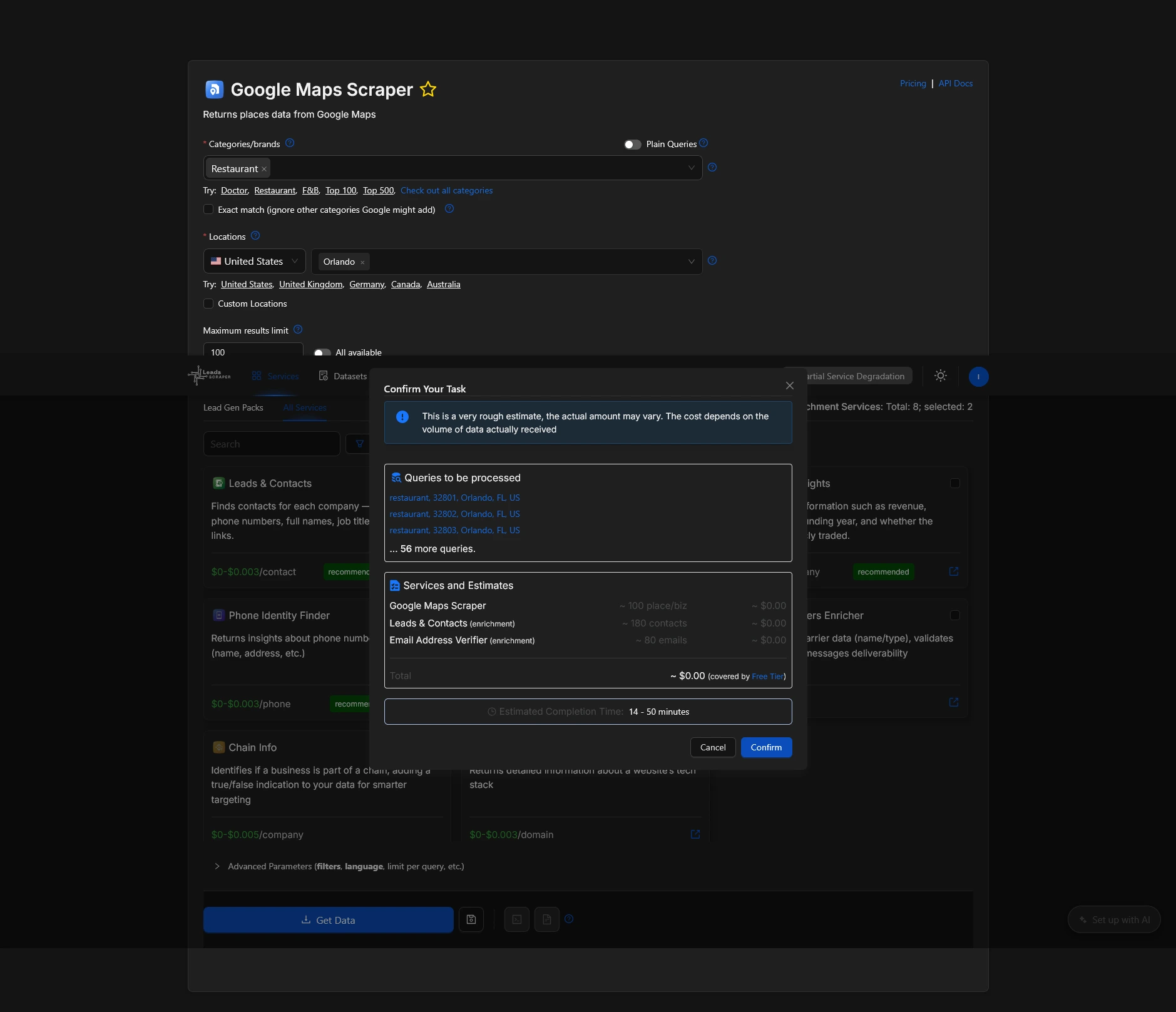
LeadsScraper lets you select Leads & Contacts and Email Address Verifier as enrichment services when setting up a Google Maps Scraper task. These services can help find additional contact details and assess the validity of email addresses found during extraction.
The Orlando restaurant example in this article uses a LeadsScraper Free Tier account. The sample task was configured with a maximum results limit of 100, with both Leads & Contacts and Email Address Verifier selected. The task confirmation showed an estimated cost of $0.00, covered by the Free Tier allocation.
This example shows how users can test business extraction and contact enrichment within their available Free Tier allocation. Actual usage and costs depend on the records and enrichment results processed, so check the task estimate before confirming.
Once the task finishes, review the enriched records and keep the contacts associated with restaurants that passed your business signal checks.
Not every restaurant will have an available email address, and email verification does not guarantee delivery or confirm buying interest. Review the results before adding contacts to your outreach list.
Step 6: Prepare Your Verified B2B Lead List for Outreach
Once the extraction task is complete, open the Tasks section in LeadsScraper and download the results in XLSX format.
In our Orlando restaurant example, the Free Tier sample returned 100 unique businesses across 182 spreadsheet rows. The additional rows reflect multiple contact records associated with some businesses.
| Business Name | Location | Website | Email Status | Website Check | ICP Fit | Next Action | |
|---|---|---|---|---|---|---|---|
| Restaurant A | Orlando | Not listed | Hidden | RECEIVING | Needs research | Pending | Check website |
| Restaurant B | Orlando | Listed | Hidden | RECEIVING | Pending review | Pending | Review website design |
| Restaurant C | Orlando | Not listed | Hidden | INVALID | Needs research | Pending | Find alternative contact |
| Restaurant D | Orlando | Listed | Hidden | UNKNOWN | Pending review | Pending | Check contact and website |
| Restaurant E | Orlando | Not listed | Not available | — | Needs research | Pending | Research contact details |
Review the name, address, website, business_status, and place_id columns to identify individual businesses. For this web design campaign, start with restaurants that have no website listed, then manually check their online presence before deciding which prospects qualify.
Next, review the email, email.emails_validator.status, and email.emails_validator.status_details columns. Separate addresses marked RECEIVING from those marked INVALID, UNKNOWN, or BLACKLISTED. Check the additional verification details, especially catch-all results, before deciding which contacts are suitable for outreach.
Organize the qualified businesses and their relevant contacts into a working prospect list. Keep notes about website findings, contact suitability, and email verification results so each outreach decision has a clear basis.
Not every restaurant in the exported results belongs on the outreach list. Keep businesses that match your campaign criteria, have a confirmed reason for further contact, and have suitable contact information. Set aside records with uncertain website information or email verification results that require additional checking.
LeadsScraper
Collect business records, find available contacts, and check email addresses using LeadsScraper's data services.
View All ServicesHow to Prioritize Qualified B2B Leads Before Outreach
A restaurant may match your target audience and have a usable email address, but that doesn’t automatically make it a strong prospect. The next decision is whether the available business information gives your agency a good reason to make contact.
For the Orlando web design campaign, restaurants with no website listed may deserve an initial review. Businesses with existing websites can also be considered if manual research identifies relevant design or usability issues.
Prioritize prospects using the relevance of their business signals, the quality of supporting information, and whether their contact details are suitable for outreach.
If your team uses several tools during prospecting, this comparison of AI lead generation tools explains how different platforms support business discovery, qualification, and outreach.
Check ICP Fit and Signal Relevance
Before prioritizing a prospect, check whether its business category, location, and operational status match your campaign requirements. A relevant signal has little value if the business falls outside your target audience.
For the Orlando web design campaign, a restaurant with no website listed may deserve closer attention than one with an established, functional website. Check the restaurant’s actual online presence before deciding whether the missing website information represents a possible opportunity.
Give higher priority to businesses where your research identifies a relevant issue that your agency can address. Keep businesses with uncertain or incomplete information in a separate group until you can confirm the findings.
Check Signal Recency and Supporting Evidence
Business information can change between searches. A restaurant that had no website listed during the initial extraction may have added one, or its listing may have been incomplete.
For the Orlando web design campaign, check when the business information was collected and whether the website-related findings are still accurate. A recent manual review provides stronger evidence than an older observation that hasn’t been checked again.
Multiple observations can also help determine which restaurants deserve attention first. For example, a restaurant with no website listed and no working website found during manual research has more supporting evidence than one with only a missing website field.
Record the date of your research and the findings behind each decision. Give higher priority to businesses with relevant, current information, and set aside uncertain cases for another review.
Avoid Common Signal-Based Prospecting Mistakes
Even after collecting business records and checking contact information, a few mistakes can affect the quality of your prospect list:
- Assuming missing information confirms a business problem: A restaurant with no website listed may still have an active website. Check its online presence before treating the missing field as a potential opportunity.
- Confusing email verification with lead qualification: An email address marked
RECEIVINGdoes not confirm that the contact is the right decision-maker or that the business needs your services. - Contacting businesses without checking the evidence: Review website findings and supporting information before assigning outreach priority.
- Keeping duplicate businesses in the outreach list: Contact enrichment can produce multiple rows for the same business. Use the business identifier to group related contacts and avoid repeated outreach.
- Failing to document qualification decisions: Record why a business was selected, when the information was checked, and what action should follow.
These checks help keep the prospect list focused on businesses with relevant, confirmed observations rather than relying on incomplete records or assumptions.
Review and Improve Your Signal-Based Prospecting Workflow
After preparing a qualified lead list, review which business signals produced useful prospects and where additional research was needed.
For the Orlando restaurant campaign, the web design agency can compare how many businesses had no website listed, how many actually lacked a website after manual checking, and how many had usable contact information.
These findings can help the agency adjust its search criteria, focus on more relevant signals, and reduce unnecessary research in future campaigns.
Track Which Signals Produce Qualified Prospects
Compare your collected business records with the results of your manual qualification checks. This helps identify which business signals produce relevant prospects and which ones require too much additional research.
For the Orlando web design campaign, the agency can review how many restaurants had no website listed in their business records and how many were confirmed to have no working website after further research. The difference shows how reliable the initial signal was for identifying potential web design prospects.
Track these measurements after each campaign:
- ICP match rate: The percentage of collected businesses that meet your targeting criteria.
- Signal confirmation rate: The percentage of businesses with a selected signal that pass your manual check.
- Qualified prospect count: The number of businesses that meet your qualification requirements.
- Manual review time: The time spent checking business information before adding prospects to the outreach list.
Use the same qualification criteria when comparing campaigns. If a signal repeatedly produces businesses that don’t meet your requirements, reconsider whether it belongs in your next search.
Check Prospect Quality Before Outreach
Before starting outreach, check whether the shortlisted business records and contact information are still accurate. Even recently collected data may contain missing details, repeated contacts, or email addresses that require another review.
Check the following:
- Business information: Confirm that the restaurant is still operating and that its location and website details are accurate.
- Duplicate contacts: Check for repeated businesses and email addresses, especially when multiple contacts appear under the same business.
- Email verification results: Review addresses marked
RECEIVING,INVALID,UNKNOWN, orBLACKLISTED. Check additional verification details before selecting contacts for outreach. - Contact suitability: Check whether the available email address or phone number is appropriate for the planned outreach method.
- Business signal accuracy: Confirm that the website-related issue identified during qualification is still relevant.
For the Orlando restaurant campaign, a business may have passed the initial qualification check but later added a website or updated its contact information. Reviewing these details before outreach helps prevent messages based on outdated information.
Adjust Your Signal Selection Based on Results
Use the findings from previous campaigns to identify which business signals produced useful prospects and which ones required too much additional research.
For the Orlando web design campaign, the agency might find that many restaurants without listed websites already have active websites. In that case, the agency could adjust its qualification criteria or include additional website-related observations during manual research.
If outreach results are available, compare response rates and qualified conversations across groups of prospects. This can help determine whether certain signals are worth testing again, although response rates alone do not confirm the quality of a business signal.
Change one or two criteria between campaigns and record the results. Comparing searches with consistent qualification standards makes it easier to see whether those adjustments improve the quality of the prospect list.
Final Checklist: Signal-Based Prospecting Workflow
- Set up your business search by category, location, and result limit.
- Apply relevant filters based on your campaign needs and account access.
- Review collected records for duplicates and missing information.
- Qualify prospects by checking ICP fit and relevant business signals.
- Enrich contacts and verify emails before adding them to your list.
- Prepare your outreach list with qualified businesses and suitable contacts.
FAQ: From Business Signals to Business Leads
Business signals indicate possible business needs, while buying intent suggests a company is actively considering a purchase.
Start with two or three relevant signals that match your target customers and the services you offer.
Yes, LeadsScraper’s Free Tier supports business extraction and email verification within available usage limits, while full Advanced Filters access requires an upgrade.
Check business signals and contact information before outreach, especially when the original data is several weeks old.
LeadsScraper helps collect business records, find available contact details, and verify email addresses, while users manually assess business signals and qualify prospects.