Table of Contents
You can automate every cold email follow-up and still lose hours building the list that feeds it.
That is where outbound sales automation often slows down. Someone still has to find the right businesses, remove poor-fit records, add contact data, and check email addresses before sending can start.
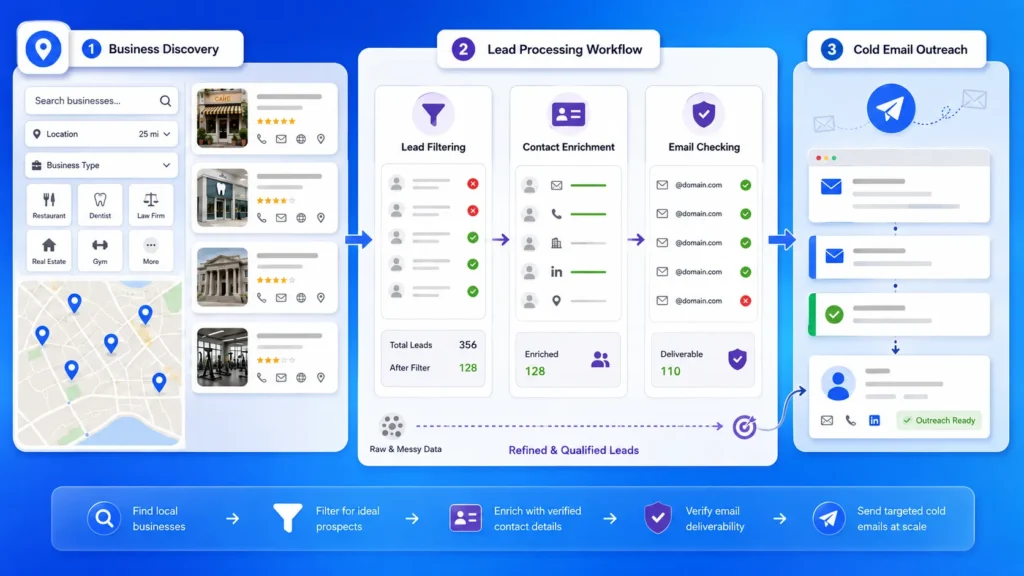
LeadsScraper.io can handle much of that pre-send work by helping you find businesses, narrow the results, add contact and company data, and check emails before moving the list into a cold email tool.
Quick Answer: How to Combine Lead Scraping With Cold Email
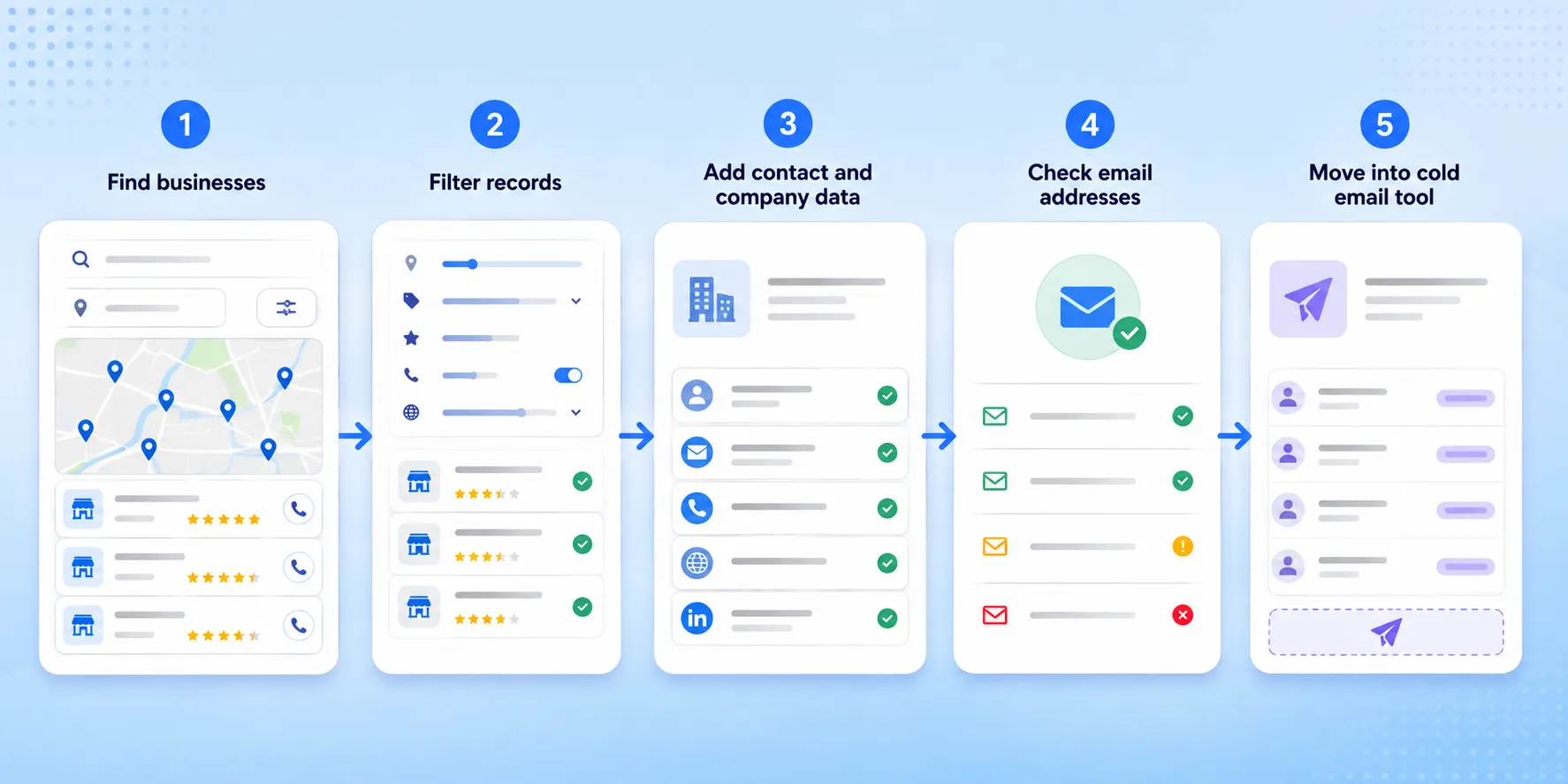
- Find businesses that match your target market.
- Filter out records that do not fit.
- Add contact and company data.
- Check email addresses before sending.
- Move the list into your cold email tool and review the results.
Start Outbound Sales Automation With the Right Lead List
Cold email works better when the list is built around clear business criteria instead of a broad batch of contacts.
Define the Businesses You Want to Reach
Start with the type of business, location, and traits that matter to the campaign.
For example, a web design agency could target dentists in Chicago that are operational and do not have a website. A local marketing agency could look for restaurants in Miami with low ratings and a listed phone number.
Define the campaign criteria first, then build the list around them. If you want a broader look at how scraping fits into prospecting, our guide to lead generation vs. lead scraping explains where each approach fits.
Find Businesses by Category and Location
A Google Maps lead scraper can turn those criteria into a starting list.
LeadsScraper.io’s Google Maps Scraper can be used to find businesses from plain search queries, category and location combinations, Google Maps URLs, or Google Places IDs.
A search such as dentists in Chicago creates the starting list. The next step is deciding which of those businesses should move forward.
Filter Records Before Contact Research
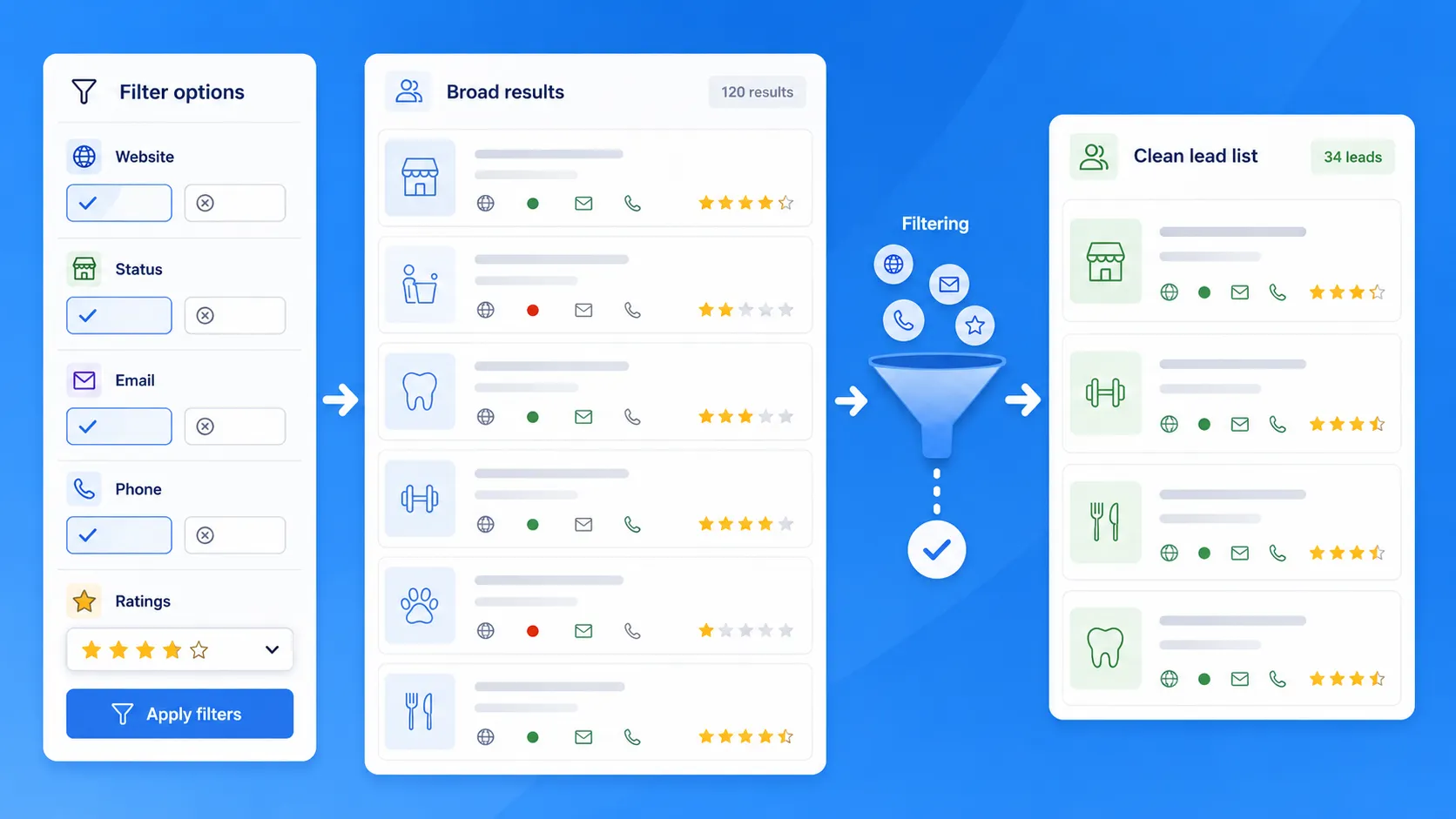
The dashboard includes filters for email availability, website presence, operational status, phone availability, ratings, and verified status. It also includes an option to remove duplicates.
In the web design example, the agency could keep only operational dentists without a website before spending time finding contacts. For a cold email campaign, it could also exclude records without email data before the list moves into enrichment and checking.
Filtering first keeps poor-fit records from moving into the next steps and cuts down the cleanup needed later.
Prepare Scraped Leads Before Cold Email Outreach
A scraped list still needs work before it is ready for cold email. The main task is to turn business records into a smaller set of contacts that fit the campaign.
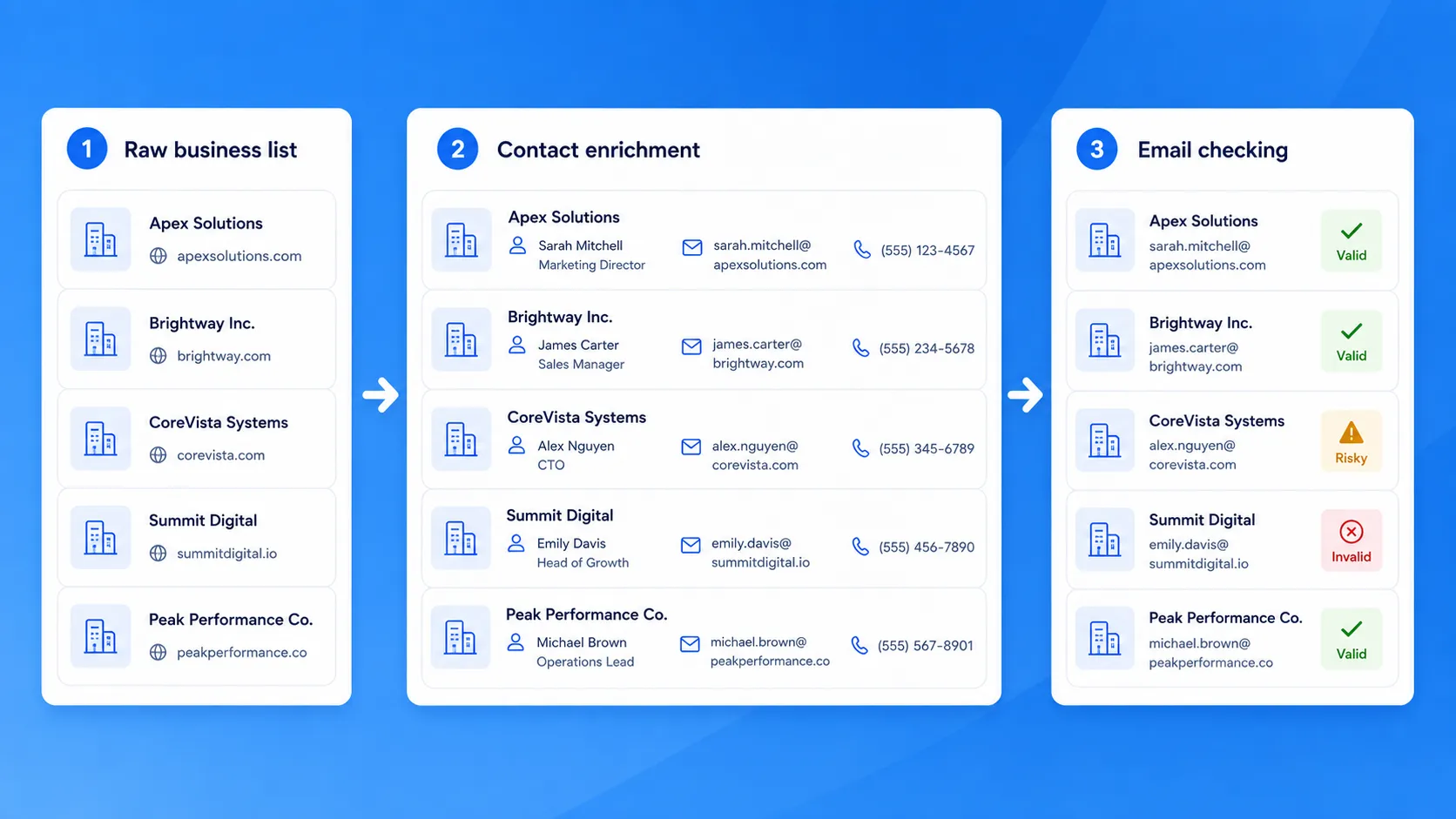
Add Contact Data to Business Records
Start by filling in the contact details you actually need for outreach.
For example, a list of 200 accounting firms in Dallas may begin with business names, websites, and addresses. Contact research can then add emails, phone numbers, names, job titles, or social links where available.
LeadsScraper.io provides Leads & Contacts Enrichment and Emails & Contacts Scraper for this part of the process. For a closer look at this stage, see our contact enrichment guide for sales teams.
This keeps business discovery and contact research separate instead of treating every company record as ready for outreach.
Add Company Context When You Need It
Some campaigns need more than a company name and email address.
A sales team targeting larger firms, for example, may want to separate businesses by company size or revenue before choosing which contacts belong in the campaign.
Company Insights can add firmographic fields such as:
- company size
- revenue
- founding year
public status
That extra context can help divide one broad prospect list into smaller groups.
Check Email Addresses Before Sending
An email found during contact research should not automatically be treated as ready for a campaign.
Check addresses first so invalid, risky, or undeliverable records can be separated before they enter the sending tool. LeadsScraper.io includes an Email Address Verifier for this step.
Checking first also keeps email research and email checking as two separate parts of the process.
Remove Duplicates and Poor-Fit Records
Do one final cleanup before export.
Remove duplicate businesses and records that no longer match the campaign criteria. For example, a web design campaign aimed at active businesses without websites does not need records for closed companies or businesses that already have a site.
The Google Maps Scraper includes duplicate removal and filters for website presence, operational status, phone availability, email availability, ratings, and verified status.
The result is a smaller list with the contact and company data needed for the next step, without sending every scraped record into the campaign.
LeadsScraper
Find businesses, add contact and company data, check email addresses before export
Prepare Your Lead ListMove Your Lead List Into a Cold Email Tool
Once the prospect list is cleaned and checked, the next step is getting it into the system that will send the campaign.
The handoff can be simple or more technical, depending on how often the process needs to run.
Use a File Export for a Simple Workflow
For smaller campaigns, a file export is often enough.
You can export the prepared records, review the columns, and upload the file into your cold email platform. LeadsScraper.io supports common output formats including CSV and XLSX, which makes this approach practical for manual campaign setup.
For example, a team could export a list of checked contacts for dental clinics in Chicago, then upload only the fields needed for the campaign.
That keeps the process easy to review before anything is sent.
Use the API for a Programmatic Workflow
Recurring campaigns may need less manual handling.
LeadsScraper.io includes API documentation, API key management, and API usage tracking. Technical teams can use that access to pass data into an internal process before it reaches a sales or outreach system.
This fits campaigns that repeatedly collect new prospect records and need the same preparation steps each time. Marketing teams running recurring prospect searches can also see how agencies automate lead collection before outreach.
An API connection does not automatically mean a native integration with a specific cold email or CRM platform. The connection still depends on the systems being used.
Choose Which Fields to Pass Into the Campaign
Do not send every available column just because it exists.
Keep the fields that support the campaign, such as the contact name, company, email address, location, job title, or another relevant business detail.
For a local agency campaign, that might mean passing only the business name, contact name, email, city, and website status into the cold email tool.
A smaller, cleaner set of fields is easier to review and gives the sending system only the data it needs.
You can also review the wider set of LeadsScraper.io services when a campaign needs other company, phone, or website data.
Use Campaign Results to Improve the Next Prospect List
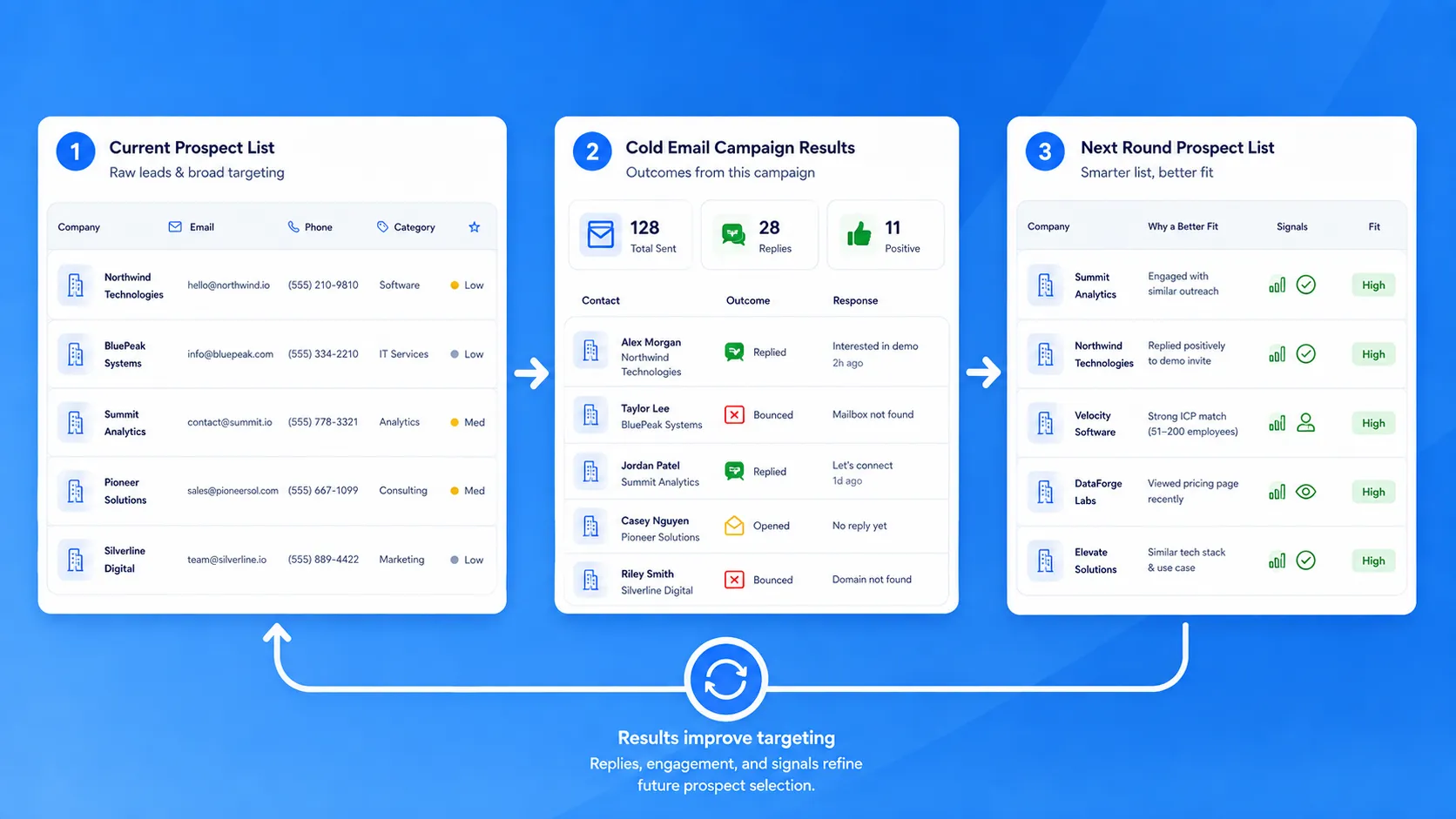
The campaign should also tell you something about the list that fed it.
Instead of looking only at email performance, compare which types of businesses produced the best responses.
Check Bounces, Replies, and Positive Responses
Start with the basic campaign results:
- bounced emails
- replies
- positive replies
- meetings or next-step conversations
These numbers help show whether the problem is with the contact data, the targeting, or the message.
Compare Results Across Prospect Segments
Break the results down by the criteria used to build the list.
For example, a campaign might compare:
- dentists in Chicago vs. dentists in Dallas
- businesses with websites vs. businesses without websites
- smaller firms vs. larger companies
- one business category vs. another
If one segment produces more positive replies, that is a useful signal for the next prospect search.
Change Your Next Search Based on What Worked
Use the results to adjust the next list instead of repeating the same search.
If operational businesses without websites produced more replies, keep that condition for the next run.
If one location produced weak results, test another market or change the business category.
The process becomes a feedback loop:
build the list → run the campaign → review the response → adjust the next list
That keeps prospect research connected to what happens after sending.
Outbound Sales Automation Checklist
Use this checklist before the next campaign:
- Define the businesses you want to reach.
- Find prospects by category, location, or another clear search condition.
- Remove records that do not fit the campaign.
- Add the contact and company data you need.
- Check email addresses before sending.
- Move the prepared list into your cold email tool.
- Review replies and use the results to refine the next prospect list.
The process works best when each step feeds the next one. A better list makes the sending stage easier to manage and gives you clearer data to use when you build the next campaign.
FAQ
Most frequent questions and answers
Outbound sales automation can cover prospect research, contact data collection, email checking, list preparation, campaign sending, and follow-up tracking. The exact setup depends on which parts of the process your team wants to handle automatically.
Scraped business records can be used as a starting point for outreach, but they should still be reviewed before sending. Check whether the contacts fit the campaign, remove duplicate or poor-fit records, check email addresses, and follow the privacy and marketing rules that apply to the markets you contact. In the US, the FTC’s CAN-SPAM requirements for commercial email apply to B2B commercial messages as well.
Yes. An address found during contact research should not automatically be treated as ready for a campaign. Checking the list first helps separate invalid, risky, or undeliverable addresses before they reach the sending tool.
LeadsScraper.io includes an Email Address Verifier for this part of the workflow.
Not always. A smaller campaign can start with a prospect list, a cold email tool, and a way to track replies. A CRM becomes more useful when several people need to manage contacts, conversations, and follow-up activity in one place.
Yes, if the tools provide the API access needed to pass data between them. LeadsScraper.io includes API documentation, API key management, and API usage tracking, which can support a programmatic handoff to another system.
A file export is still a practical option when the campaign does not need that level of automation.
Yes. Lead scraping handles the prospect-data side of the workflow, while the cold email platform handles sending and follow-ups.
LeadsScraper.io can be used to find businesses, add contact and company data, check email addresses, and prepare the records before they move into an external cold email tool.
That keeps the workflow clear: build and check the list first, then send the campaign through the tool your team already uses.