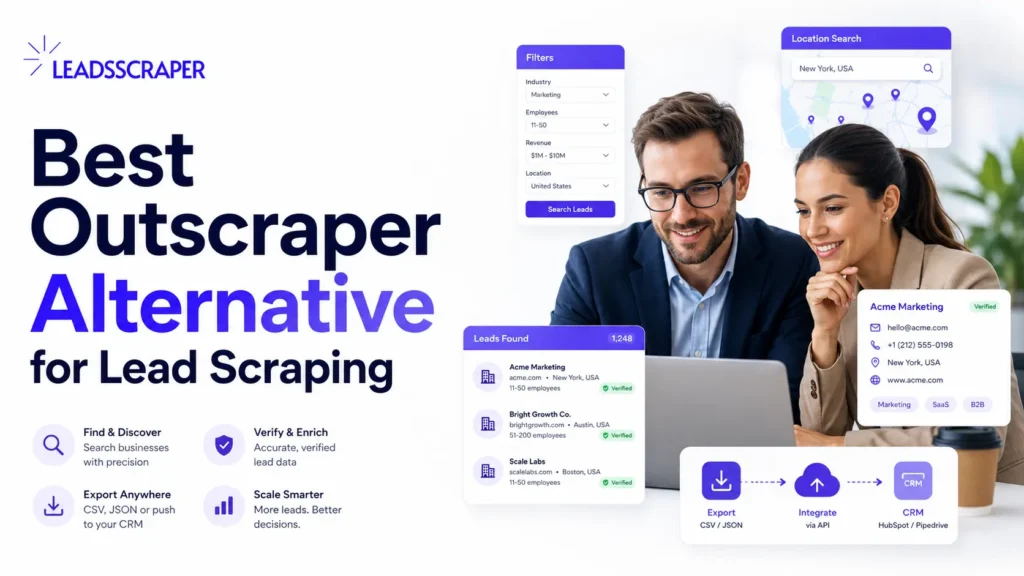
Outscraper is a strong tool for scraping Google Maps data, but it is not the only option for teams building lead lists. If the goal is lead scraping, contact enrichment, email verification, and clean exports without building a technical workflow, LeadsScraper can be a practical Outscraper alternative.
The important question is not “Which scraper has more features?” The better question is: which tool gives your team a cleaner path from search query to contact-ready lead list?
For many users, that path looks like this:
search Google Maps or Google Search → collect business records → enrich contacts → verify emails → export the list → upload to CRM or outreach tool
That is the workflow this article compares.
What Makes a Real Outscraper Alternative?
A real Outscraper alternative should not just copy the word “scraper” and export a CSV. It should help a user move from public business data to a lead list that can actually be used for outreach.
For lead scraping, that means the tool should support the full path from search to export, including contact enrichment when the scraped business record does not yet have a usable contact path. The user should be able to choose a target market, collect business data, find contact paths, verify email addresses when needed, and download the list in a usable format.
This is where many scraping tools fall short. They pull rows from Google Maps, but the user still has to clean duplicates, find emails somewhere else, verify the emails with another tool, and rebuild the file before outreach.
A useful alternative should reduce that handoff.
For lead scraping teams, the key requirements are:
- Google Maps lead scraping
- Google Search lead scraping
- business name, website, phone, address, and category fields
- contact enrichment
- email verification
- clean CSV or spreadsheet export
- no-code workflow for non-technical users
- advanced filters for users who need tighter targeting
- API access for users who want to scale later
LeadsScraper fits this comparison because it is built around Google-based lead collection, enrichment, verification, and exports rather than only raw scraping.
Where LeadsScraper Fits Better
LeadsScraper makes sense when the user wants a lead scraping workflow, not only a data extraction workflow. That distinction matters.
A data extraction workflow asks:
Can I pull data from a source?
A lead scraping workflow asks:
Can I turn that data into a usable prospecting list?
Those are different jobs.
A local agency, sales team, recruiter, freelancer, or B2B service provider usually does not want to spend half the day building a custom stack. For agencies, this connects directly to agency lead collection: finding local businesses, enriching contact paths, and preparing records for outreach.
That is the practical reason someone might look for an Outscraper alternative. It is not always because Outscraper is bad. Often, it is because the user wants a shorter lead scraping path with fewer moving parts.
Use LeadsScraper when the job is:
- building Google Maps lead lists
- scraping leads from Google Search
- finding local business contact details
- enriching records with contact data
- verifying emails before outreach
- exporting lead lists for CRM upload
- giving non-technical users a no-code workflow
That is the strongest angle for LeadsScraper.
Outscraper vs LeadsScraper: Quick Comparison
Outscraper and LeadsScraper both sit in the Google business data and lead scraping space, but they serve slightly different user expectations. Outscraper is strong for users who want a mature scraping platform, API-driven workflows, and advanced Google Maps data extraction. LeadsScraper should be positioned differently: as a lead-list-first workflow for users who want Google Maps or Google Search records, contact enrichment, email verification, and exports without building a technical stack.

| Comparison Point | LeadsScraper | Outscraper |
|---|---|---|
| Best fit | Users who want a no-code lead scraping workflow | Users who want a broader scraping and API workflow |
| Main use case | Google-based lead lists for sales and outreach | Google Maps data extraction, scraping, and API use |
| Data sources | Google Maps and Google Search lead scraping | Google Maps scraping and related data services |
| Contact workflow | Built around scraping, enrichment, email verification, and export | Strong scraping plus enrichment/API options |
| User type | Agencies, freelancers, sales teams, B2B teams, non-technical users | Data teams, growth teams, agencies, and developers |
| Technical level | Good for no-code users | Good for no-code users and technical/API users |
| Export goal | CRM-ready or outreach-ready lead list | Flexible data export and API workflows |
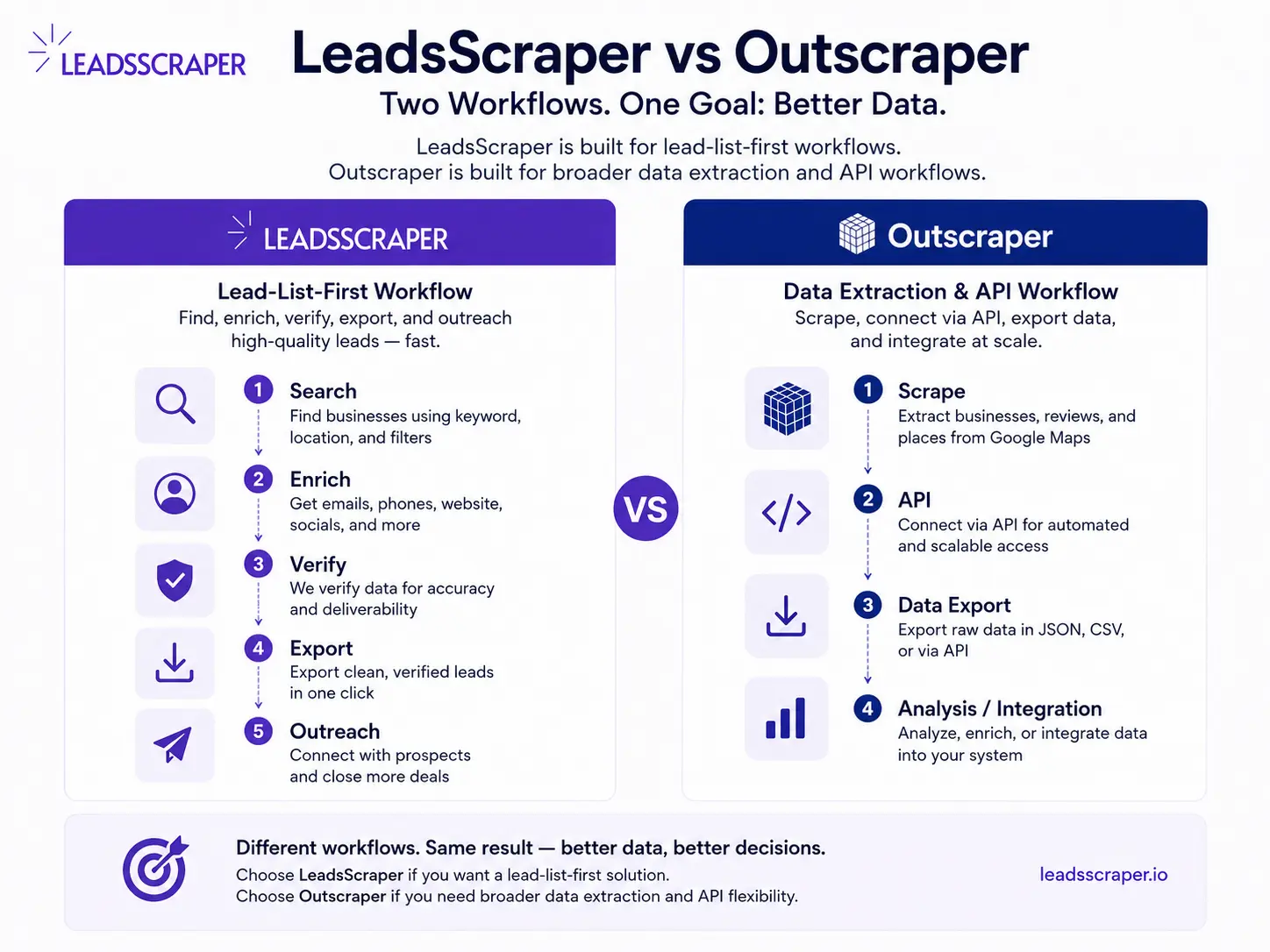
This comparison is not about calling one tool better for every user. It is about matching the tool to the job.
If the job is deep data extraction or developer-led API work, Outscraper can still make sense. If the job is building a clean lead list from Google data and moving it into outreach, LeadsScraper may be the easier fit.
The Real Problem: Scraped Data Is Not Always a Lead List
A common mistake is thinking that a scraper automatically creates leads. It does not. It creates records. That difference matters because lead scraping vs lead generation are connected, but they are not the same workflow.
A Google Maps scrape might return a business name, phone number, address, website, rating, category, and other fields. That is useful, but it is still only the first layer. A lead list needs cleanup, enrichment, and routing before a sales team can use it.
For example, a raw scrape for “roofing contractors in Dallas” may include:
- businesses outside the target area
- duplicate branches
- companies with no website
- listings with only a front-desk number
- closed or inactive records
- businesses that do not match the offer
- records with no verified email
This is where a lead-list-first workflow matters. The user should not have to export raw rows, manually clean every field, copy websites into another tool, verify emails somewhere else, and rebuild the file from scratch.
LeadsScraper is useful because the workflow can stay closer to the sales task: find the businesses, enrich the contact path, verify what can be verified, and export a cleaner list.
When LeadsScraper Is the Better Choice
LeadsScraper is the better choice when the team wants a direct path from Google business data to a usable outreach list.
A marketing agency does not always need a custom API pipeline to test a local campaign. A freelancer does not always need a technical dashboard to pull a niche list. A sales team does not always need every possible data field. They need enough correct fields to decide who to contact and how to contact them.
LeadsScraper is a good fit when:
- you want Google Maps leads without coding
- you also want Google Search lead scraping
- you need emails and contact details added to records
- you want email verification before outreach
- you want CSV or spreadsheet exports
- you are building lists for local outreach, B2B prospecting, recruiting, or agency campaigns
- you want a workflow that a non-technical team member can run
The main advantage is operational. Instead of thinking in separate tools, the user can think in steps: search, scrape, enrich, verify, export.
That is easier to hand off because the process is visible: search terms, enrichment status, verification status, and export file are all part of the same lead-list workflow.
The Real Problem: Scraped Data Is Not Always a Lead List
A common mistake is thinking that a scraper automatically creates leads. It does not. It creates records. That difference matters because lead scraping vs lead generation are connected, but they are not the same workflow.
A Google Maps scrape might return a business name, phone number, address, website, rating, category, and other fields. That is useful, but it is still only the first layer. A lead list needs cleanup, enrichment, and routing before a sales team can use it.

For example, a raw scrape for “roofing contractors in Dallas” may include:
- businesses outside the target area
- duplicate branches
- companies with no website
- listings with only a front-desk number
- closed or inactive records
- businesses that do not match the offer
- records with no verified email
This is where a lead-list-first workflow matters. The user should not have to export raw rows, manually clean every field, copy websites into another tool, verify emails somewhere else, and rebuild the file from scratch.
LeadsScraper is useful because the workflow can stay closer to the sales task: find the businesses, enrich the contact path, verify what can be verified, and export a cleaner list.
When LeadsScraper Is the Better Choice
LeadsScraper is the better choice when the team wants a direct path from Google business data to a usable outreach list.
A marketing agency does not always need a custom API pipeline to test a local campaign. A freelancer does not always need a technical dashboard to pull a niche list. A sales team does not always need every possible data field. They need enough correct fields to decide who to contact and how to contact them.
LeadsScraper is a good fit when:
- you want Google Maps leads without coding
- you also want Google Search lead scraping
- you need emails and contact details added to records
- you want email verification before outreach
- you want CSV or spreadsheet exports
- you are building lists for local outreach, B2B prospecting, recruiting, or agency campaigns
- you want a workflow that a non-technical team member can run
The main advantage is operational. Instead of thinking in separate tools, the user can think in steps: search, scrape, enrich, verify, export.
That is easier to hand off because the process is visible: search terms, enrichment status, verification status, and export file are all part of the same lead-list workflow.
When Outscraper May Still Be Better
Outscraper may still be the better option when the user needs a broader scraping platform, a mature API workflow, or deeper Google Maps extraction options.
That section matters because a comparison article should be honest. Someone searching for an Outscraper alternative is usually already aware of Outscraper. If the article pretends Outscraper has no strengths, it loses trust.
Outscraper can be a better fit when:
- the team already uses Outscraper’s API
- the workflow is developer-led
- the project needs broader data extraction beyond a simple lead list
- the user wants advanced Google Maps scraping controls
- the team is comfortable managing separate enrichment, verification, and export steps
- the output is for data analysis, not immediate outreach
That does not weaken the LeadsScraper argument. It makes the comparison more useful.
The choice depends on the job. A data team may prefer flexibility. A sales team may prefer a shorter path to a clean lead list.
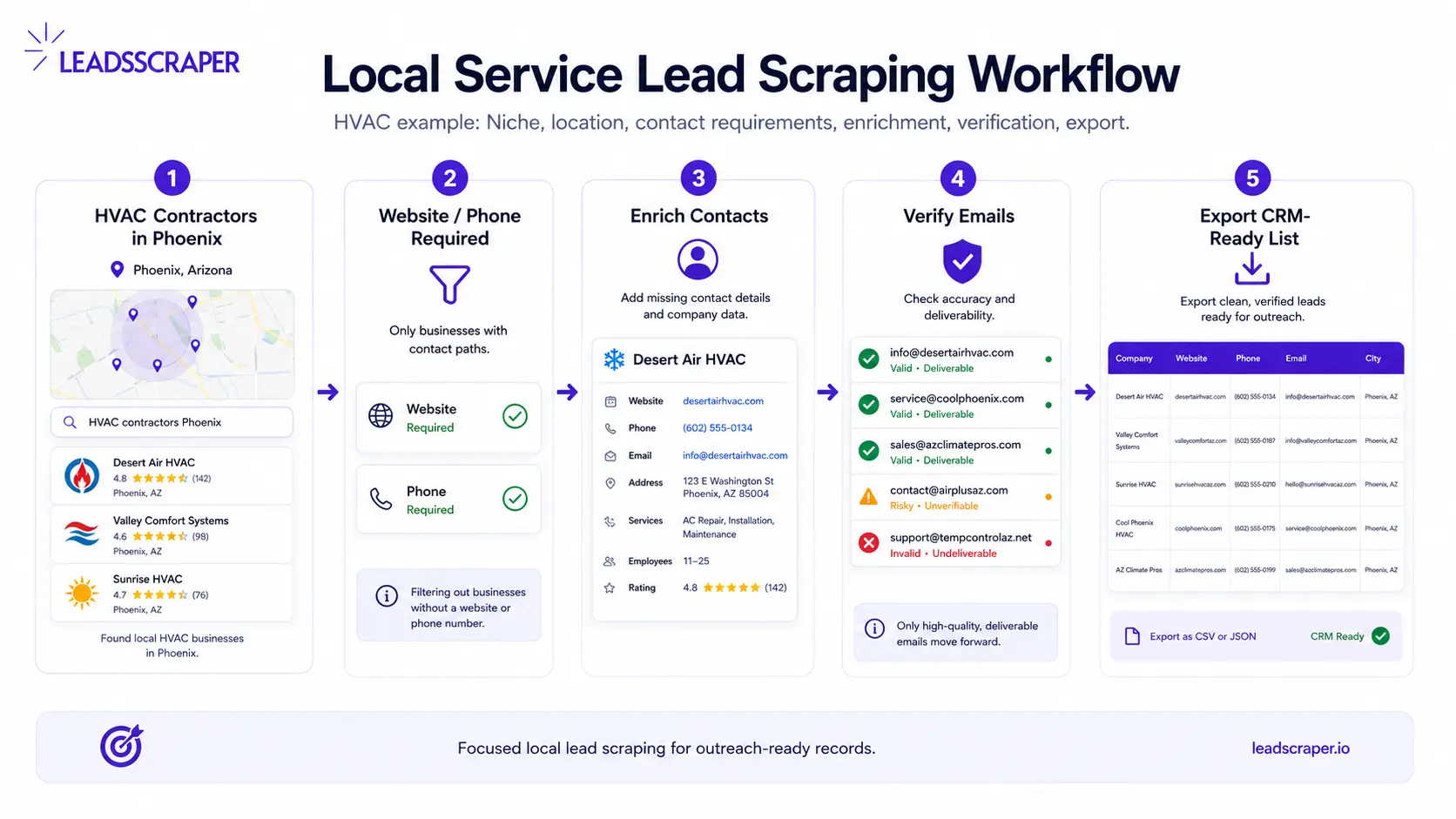
Example: Local Service Lead Scraping Workflow
Here is a realistic workflow for a team looking for an Outscraper alternative because they want leads, not just data.
The campaign target is:
HVAC contractors in Phoenix with a public website and visible phone number
The workflow should not start with “scrape everything.” It should start with a segment:
category: HVAC contractors
location: Phoenix, AZ
contact path: website or phone visible
status: active business
export goal: CRM-ready lead list
The first Google Maps lead scraping step collects the business records. The enrichment step checks websites for contact details. The verification step reduces bad email risk. The cleanup step removes duplicates, irrelevant businesses, and records that do not match the campaign.
The final list should not be judged by the number of rows. It should be judged by how many records are usable for outreach.
A strong lead list should answer:
- Who is the business?
- Where is it located?
- What category does it belong to?
- Is there a website?
- Is there a phone number?
- Is there an email or contact page?
- Has the email been verified?
- Should this lead go to email outreach, phone outreach, or manual review?
That is the difference between scraping data and building a lead scraping workflow.
What to Check Before Switching Tools
Before choosing any Outscraper alternative, check the workflow from beginning to end. The tool should match the way your team actually builds lead lists.
Do not compare only the first scrape. Compare what happens after the scrape.
Ask these questions:
- Can the tool search by niche, keyword, or location?
- Does it support Google Maps and Google Search lead scraping?
- Can it enrich records with emails or contact details?
- Can it verify email addresses before outreach?
- Does it export in the format your CRM accepts?
- Can a non-technical user run the workflow?
- Can the team scale with advanced filters or API access later?
- Does the pricing make sense after enrichment and verification are included?
The last question is important. Some tools look affordable at the scraping step but become harder to compare after enrichment, verification, and exports are added. Always compare the full workflow cost, not only the first data pull.
For LeadsScraper, check the full cost across scraping, domain enrichment, and email verification, not only the first data pull. The pricing page separates Google Maps Data Scraper, Emails & Contacts Scraper, and Email Address Verifier, so compare the full workflow cost instead of only the first scrape.
Build a Cleaner Lead List From Google Data
Start with one focused segment. Choose the niche, location, contact requirements, and export format before scraping. LeadsScraper helps collect Google Maps and Google Search leads, enrich contact details, verify emails, and export a cleaner list for outreach.
Common Mistakes When Comparing Outscraper Alternatives
The first mistake is comparing tools by feature count only. More features do not always mean a better workflow. A smaller set of features can be better if it gets the sales team to a cleaner list faster.
The second mistake is ignoring enrichment. If the scraper gives you websites but no contact path, the list still needs work. For outreach, a business record is more useful when it has a phone number, email, contact page, or verified contact route.
The third mistake is skipping email verification. Unverified emails can create bounce problems and waste outreach volume. Verification should be part of the workflow when email outreach is the goal.
The fourth mistake is choosing a tool for developers when the daily user is not technical. If the person running the campaign is a marketer, VA, freelancer, or sales rep, a no-code workflow matters.
The fifth mistake is treating every record as equal. A clean lead list should separate email-ready records, phone-first records, duplicates, and manual-review records before outreach starts.
This is where LeadsScraper should be positioned clearly: not as the most complicated scraping platform, but as a practical tool for teams that want Google-based lead scraping without overbuilding the process.
Is LeadsScraper the Best Outscraper Alternative?
LeadsScraper is a strong Outscraper alternative for teams that want a lead-list-first workflow built around Google Maps leads, Google Search leads, contact enrichment, email verification, and clean exports.
It is not the answer for every scraping project. If the project is highly technical, API-heavy, or built around broader data extraction, Outscraper may still be the better fit.
But if the goal is to build lead lists for outreach, LeadsScraper deserves consideration because it focuses on the steps sales teams actually need after the scrape:
find businesses → enrich contacts → verify emails → export the lead list
That is the use case.
Not scraping for the sake of scraping.
Choose LeadsScraper when the job is not just collecting Google data, but preparing a cleaner lead list your team can enrich, verify, export, and actually use for outreach.
FAQ
Most frequent questions and answers
LeadsScraper is a strong Outscraper alternative for users who want Google Maps lead scraping, Google Search lead scraping, contact enrichment, email verification, and clean exports in a simpler no-code workflow.
LeadsScraper can be better for teams focused on lead scraping and outreach-ready lists. Outscraper may still be better for users who need broader data extraction, mature API workflows, or more advanced Google Maps scraping options.
Compare the full workflow cost, not only the first scrape. Check what you need for scraping, contact enrichment, email verification, exports, and API access before choosing a tool.
Yes. LeadsScraper is designed to collect business leads from Google Maps and Google Search, including public business data that can be used for outreach and CRM workflows.
LeadsScraper has an Email Address Verifier as part of its lead scraping workflow, so users can verify emails before using them for outreach.
LeadsScraper fits agencies, freelancers, sales teams, recruiters, and B2B teams that want a simpler way to collect Google-based leads, enrich contact details, verify emails, and export lists without coding.
Try a Lead-List-First Scraping Workflow
Choose LeadsScraper when the goal is not just collecting Google data, but preparing a cleaner lead list your team can enrich, verify, export, and actually use for outreach.